Security
IronFlock 1.6.29 · November 2026Security built in, from the machine to the platform
How IronFlock connects
Everything connects from the inside out
- 1 · Machines and devicesPLCs, sensors, cameras and edge PCs connect to IronFlock themselves, each with its own credential. They open no port.
- 2 · IronFlock in your plant or ITThe whole platform on one appliance: data, apps, boards, alarms and the assistant. Works without internet. One encrypted entry point for people and devices.
- 3 · The IronFlock cloud, when you want itRemote service, the app store and views across sites. Reached outbound on the standard web port, through your corporate proxy.
For segmented networks the appliance sits in your IT and the shop floor talks only to it, so no shop-floor device talks to the internet.
Network requirements in the docsBacked by the BSI's recommendation for industrial remote connections, BSI-CS 108 "Fernwartung im industriellen Umfeld": connections are initiated from inside the plant and no port is opened for connections from outside. The zone layout follows the zones-and-conduits model of IEC 62443-3-2.
Deployment models
Runs where your security policy says
- MinimalFactory OnlineOT → IronFlock cloudDevices connect to the IronFlock cloud directly, outbound and encrypted. The way most pilots start.
- SimpleAppliance in the OTOT (appliance) → cloud, optionalIronFlock in a Box on the line. Everything runs locally; the cloud adds remote service and the store.
- SegmentedAppliance in IT / DMZOT → IT (appliance) → cloud, optionalThe appliance sits in your IT; the shop floor talks only to it. No shop-floor device talks to the internet.
- Private cloudFactory OfflineOT → your private cloud or data centreThe full platform in your own cloud account or data centre, for groups with many sites and their own IT policy.
Backed by the segmentation that IEC 62443-3-2 (zones and conduits), NIST SP 800-82 (a DMZ between OT and IT) and the BSI ICS-Security-Kompendium recommend for plant networks.
Deployment options in the docsProvisioning devices
Every device has its own identity before it boots
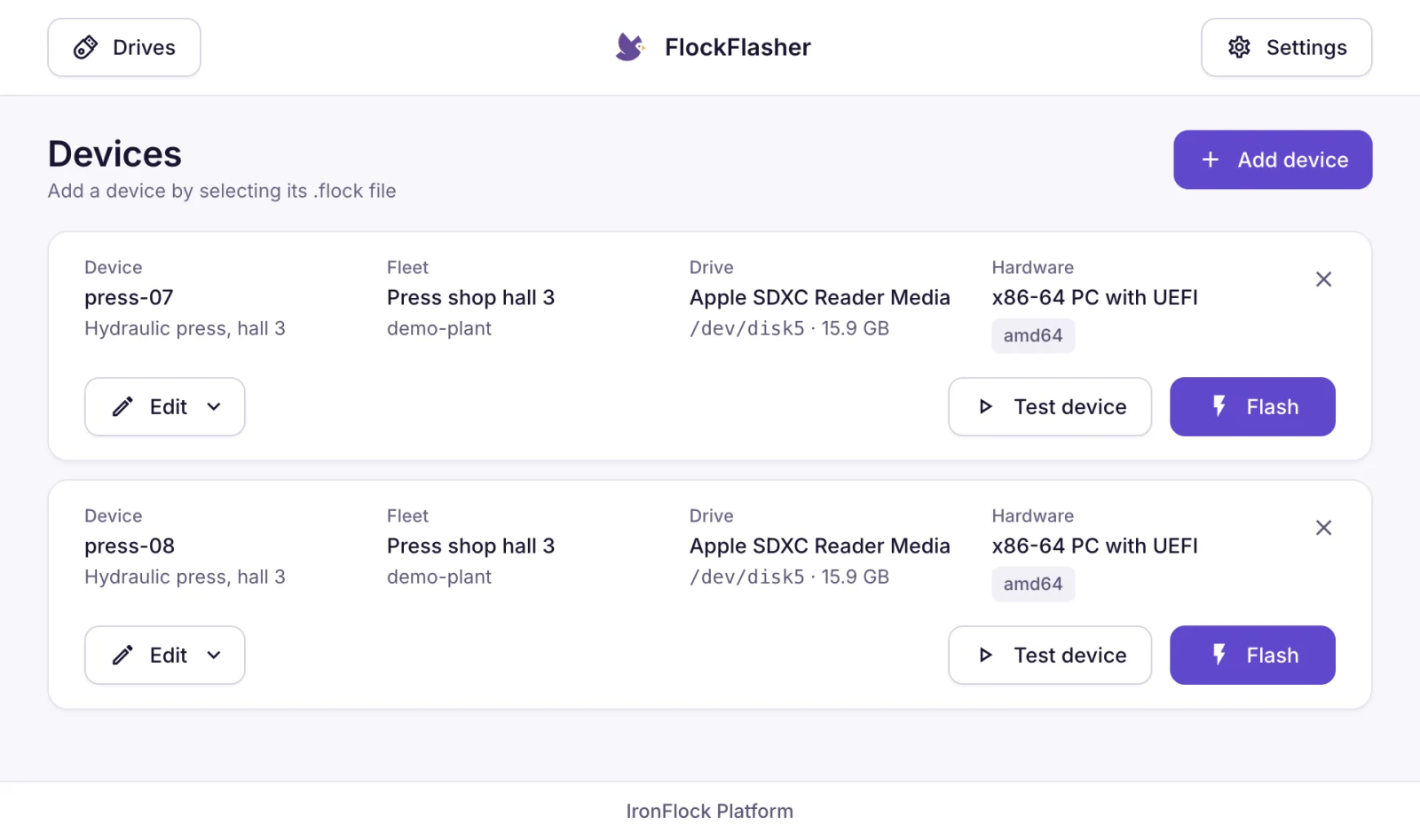
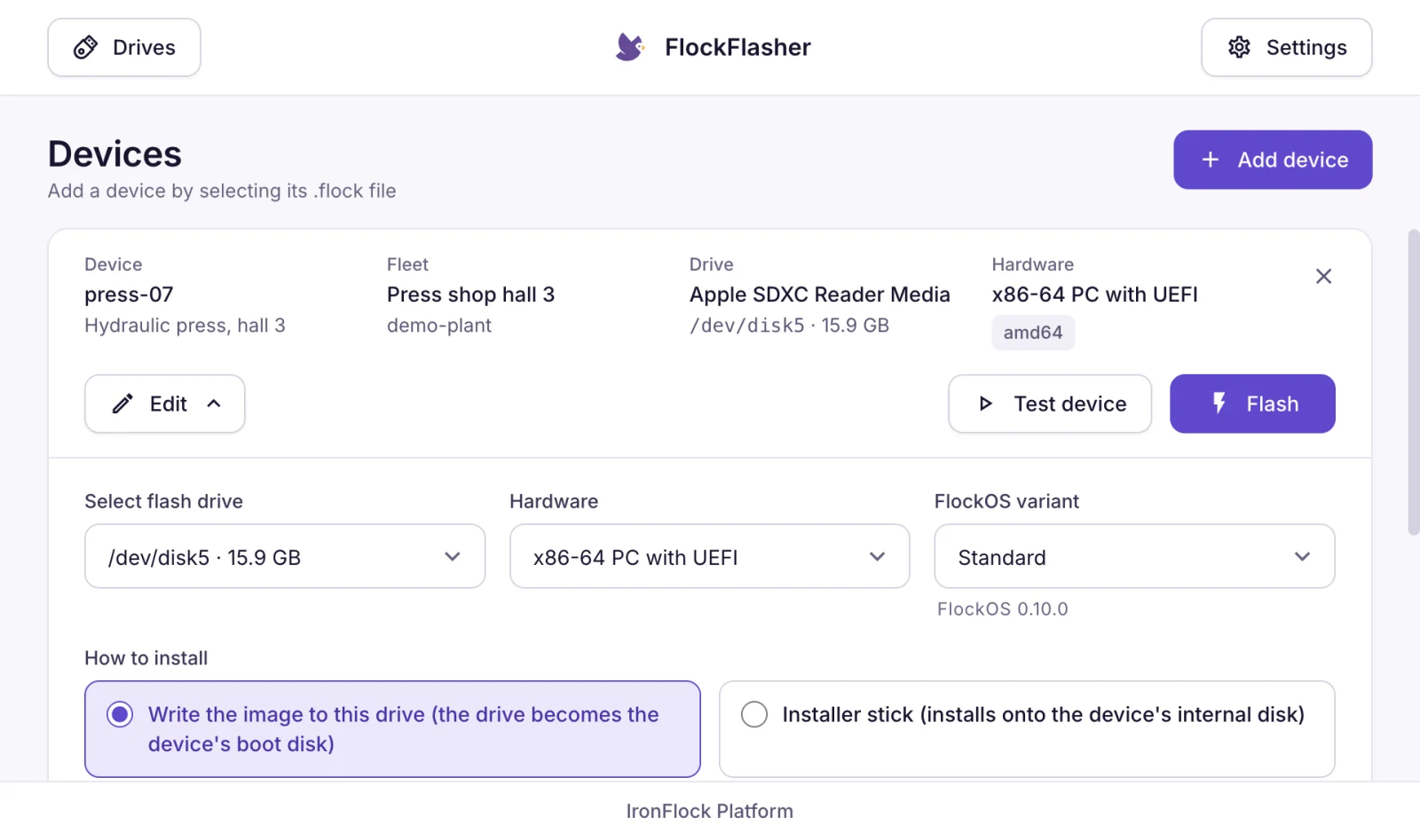
FlockFlasher: a batch of devices ready to flash, each with its own identity, and the settings of one device with hardware and FlockOS release. The FlockFlasher also runs a device on a laptop, so apps and boards are tested before the hardware is provisioned.
Backed by IEC 62443-3-3 SR 1.2, which asks that every device identifies and authenticates itself, and the Cyber Resilience Act's secure-by-default requirement in Annex I: unique credentials instead of shared defaults.
Updates you can trust
Every piece of software is signed, checked and rolled back if needed
- Operating systemSigned system imagesSigned images and update bundles, installed next to the running system and switched over only once they work. Each image comes with a signed record of how it was built and a complete parts list, rescanned for known weaknesses every week.
Update authenticity and integrity as IEC 62443-4-2 CR 3.10 RE 1 requires · fail-safe update with automatic recovery as in NIST SP 800-193 · signed build provenance in the SLSA format · CycloneDX SBOM, the format BSI TR-03183-2 names
- Device agentSigned agent updatesThe IronFlock agent on each device installs only updates signed by IronFlock and returns to the previous version if an update fails. Releases for Windows are signed as well, and a signed parts list of every release is published.
IEC 62443-4-2 CR 3.10 RE 1 (update authenticity and integrity) · Windows code signing (Authenticode) · signed CycloneDX SBOM per release, as the Cyber Resilience Act's Annex I asks
- AppsControlled app rolloutsApps are installed, updated and rolled back from the platform. Each app runs isolated with its own data. Deeper access to a device is granted per app and revocable at any time.
Least privilege and restricted data flow as IEC 62443-3-3 SR 2.1 and FR 5 describe · limited impact of an incident, as the Cyber Resilience Act's Annex I asks
- The on-site appliance installs only releases signed by IronFlock and checks every file and image against the signed release record. Secure distribution of updates, Cyber Resilience Act Annex I Part II (7).
- The appliance keeps a local copy of agent updates, so devices on the shop floor update without reaching the internet. Updates staged inside the perimeter, the pattern NIST SP 800-82 describes.
- Every release ships with release notes that list its security changes, and appliance owners get them by email. Advisories with every security update, Cyber Resilience Act Annex I Part II (4) and (8).
Remote service
Remote service without opening doors
Service staff reach exactly the machine interface they need, when it is switched on, and every session is recorded. Connections start inside the plant: the remote-maintenance pattern IEC 62443 and the BSI recommend.
How remote access works- Connections from the inside outNo inbound firewall rule, no VPN and no jump host in your plant.
- Per machine, per interfaceWhich interfaces can be reached is declared by the app and switched per device by people with the right permission.
- Brokered and recordedSessions run through the IronFlock cloud or your private cloud and appear in the device's audit log.
- Operating screens and servicesRemote access reaches the machine's operating screens and services. Machine safety stays with the machine and its safety controls.
Backed by BSI-CS 108 "Fernwartung im industriellen Umfeld": remote maintenance is initiated from inside the plant, needs no open inbound port and is logged. IEC 62443-3-3 SR 1.13 with RE 1 asks for exactly this: access from untrusted networks is controlled and granted only on explicit approval, and SR 2.8 asks that it leaves an audit trail.
Access
Who may do what is explicit
- Permissions per project, device and appOperate, develop, install, network and maintain are separate permissions, granted per asset.
- A second factor for every accountTwo-factor authentication with authenticator apps and security keys is available for every account.
- Every app isolatedEach app runs in its own space with its own data. Access to another app's data is declared by the app and granted explicitly.
- Deeper device access on approvalAn app that needs privileged access to a device asks for it. The access is granted per app and revocable at any time.
- Everything in the audit logChanges to projects, devices and apps, logins and remote sessions are recorded with who, what and when.
- One identity per person and per devicePeople sign in once through the platform's identity service. Every device has its own credential, created when it is enrolled.
Backed by NIS2 Art. 21(2), which lists access control (i) and multi-factor authentication (j) among the required measures, and IEC 62443-3-3: multifactor authentication (SR 1.1 RE 2), least privilege (SR 2.1) and auditable events (SR 2.8).
Your data
Your data, where you decide
Where it lives
- On site with the appliance, in your private cloud, or in the IronFlock cloud, hosted in the EU.
- The on-site models keep machine data in your plant; the cloud connection is optional.
- Full export of all data at any time, in line with the EU Data Act.
EU Data Act, Chapter VI: switching between services and taking your data with you · GDPR Art. 28: the roles are set out in the data processing agreement
How it is protected
- Encrypted on every connection, on the shop floor as well as to the cloud. Sensitive values are encrypted in the database.
- GDPR roles and measures are set out in the data processing agreement.
- The AI assistant processes your questions without storing them and marks its answers as AI-generated.
Encryption in transit (TLS) and at rest as GDPR Art. 32 and IEC 62443-3-3 SR 4.1 ask · AI-generated answers marked as the AI Act's Art. 50 requires
Standards
Designed for the standards your IT works with
Designed with the standards in mind
IEC 62443, NIS2, the Cyber Resilience Act and ISO 27001 shaped the architecture and the release process: connections from the inside out, signed software, a complete parts list for every release, and a public process for reporting and announcing security fixes. Every section above names the clause it answers.
- IEC 62443
- NIS2
- Cyber Resilience Act
- ISO 27001
- BSI
- NIST SP 800-82
- Data Act
- AI Act
- GDPR
Transparent by default
- Release notes with a Security section for every version, and an email to appliance owners.
- Published signing keys and fingerprints, so you can verify what you install.
- A public security contact ([email protected]) and an advisories page for researchers and customers.
Coordinated vulnerability disclosure as ISO/IEC 29147 and 30111 describe and the Cyber Resilience Act's Annex I Part II requires · a machine-readable security contact per RFC 9116 (security.txt)
Questions security teams ask first
Do we need to open firewall ports for IronFlock?
Devices and the appliance connect outbound on the standard web port, encrypted. The destinations for the firewall allowlist are published in the documentation. Remote service works through the same outbound connections.
Can IronFlock run without internet?
Yes. With the appliance or a private cloud the whole platform runs locally, including apps, boards, alarms and the AI assistant. Connecting to the IronFlock cloud is optional and adds remote service, the app store and cross-site views.
Where is our data stored?
Where you decide: on the appliance in your plant, in your private cloud, or in the IronFlock cloud, which is hosted in the EU. All data is exportable at any time.
Who can access our machines remotely, and is it recorded?
People with the network permission on that device, through connections the device opens itself. Every session is recorded in the device's audit log.
How do you keep the software secure over time?
Every change and every release passes automated security checks, released software and its parts lists are rescanned every week, and every release ships with release notes that list its security changes. Updates are signed and verified before installation.
How does IronFlock relate to machine safety?
IronFlock is a data and application platform that connects to a machine's operating screens and services. Machine safety stays with the machine and its safety controls.
Talk to an engineer about your plant
An IronFlock engineer walks through the deployment model and the connections for your sites with you. IronFlock's detailed security assessment of the appliance is available on request.